Chat
Three reply drafts, in three tones
Supportive, direct and motivating — all of them answer the shoulder question. You insert one into the composer, polish it and send it yourself.
Clients snap meals and log workouts in the app. You see everything on one dashboard, and Coach AI turns their real data into reply drafts, exercise swaps, programs and insights — nothing goes out without your approval.
Client app
Real data
Everything was captured on Monday, October 5, 2026, in the workspace of coach Iva and her client Petar — the meals, the workout, the messages and the AI suggestions. The app is in Macedonian.
AI for clients
The client snaps the meal or describes it in words. AI recognizes the ingredients, estimates the portions and works out calories and macros — and the client can fix anything before saving.
01
Camera or gallery — in a few seconds AI recognizes the food and estimates the portions.
Real example
“Falafel bowl with vegetables and hummus” — 650 kcal, 25 g protein, 61 g carbs, 36 g fat.
02
No photo? One sentence is enough, in Macedonian or English.
Real example
“Wholegrain toast with avocado, cherry tomatoes and pumpkin seeds, and a glass of almond milk” — 367 kcal and five ingredients with grams.
03
Grams change with one tap, and “Fix with AI” corrects the result without starting over. The saved meal is in the diary right away — and with the coach.
Real example
Breakfast, a snack and lunch — 1,306 of 2,778 kcal, without a single food typed in by hand.
Coach AI for the trainer
Petar finished his workout and wrote that his left shoulder hurt on the overhead press. Coach AI read his sets, goals and messages — these are the suggestions his coach got, without a single word polished for this site.
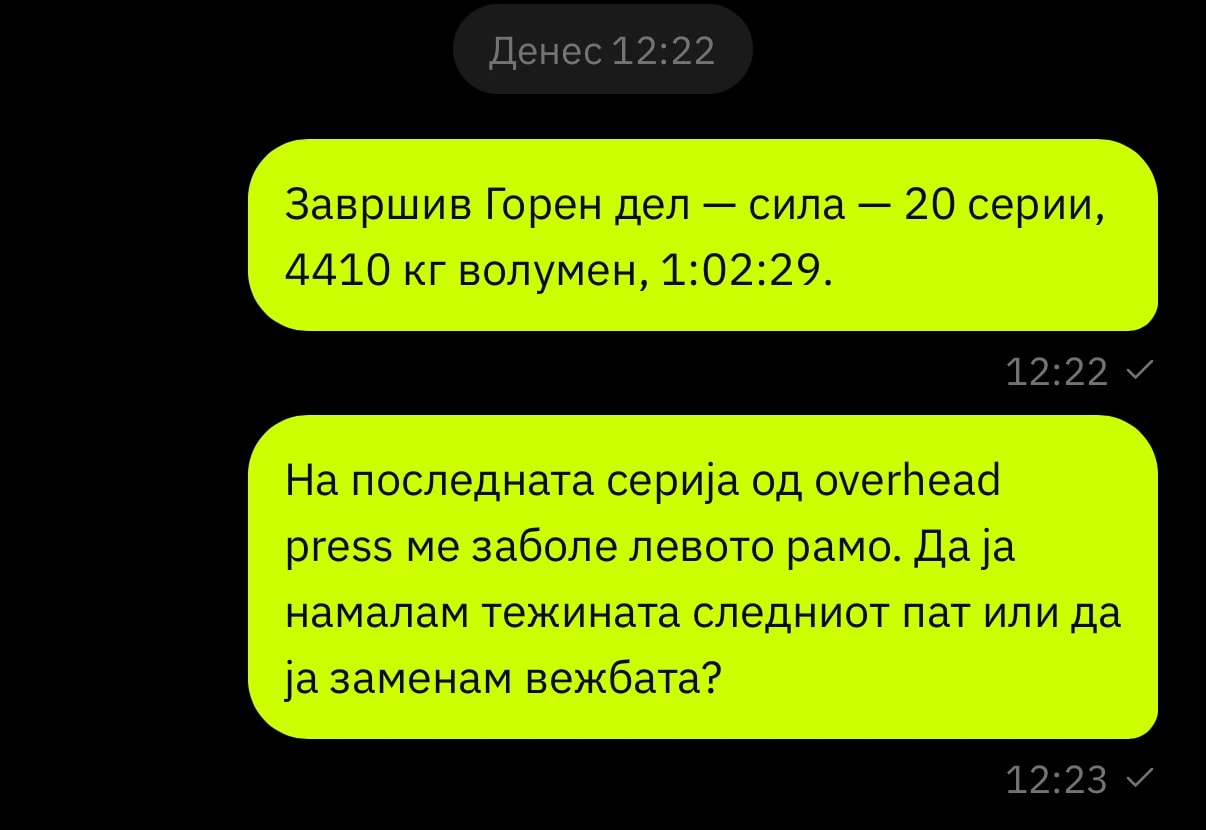
Before it suggests anything, Coach AI reads:
Chat
Supportive, direct and motivating — all of them answer the shoulder question. You insert one into the composer, polish it and send it yourself.
Exercise swap
Reason: “pain in the left shoulder when pressing overhead”. AI suggests face pulls and lateral raises from your library — each with a rationale.
Program generator
“No overhead pressing until the pain is gone.” AI built a five-day program from your exercises and checked it against Petar's dossier: no conflicts.
Progression
From the real sets: dumbbell incline press 35.8 kg × 10 → 37.5 kg, dumbbell row 24 → 27.5 kg. You adjust and confirm.
AI insight
Trends, risks, recommended actions and talking points — with numbers from the diary and workouts, nothing invented. Plus a ready message to insert into the chat.
Nutrition adherence
The server calculates the gaps for the last 14 days, separately for workdays and weekends. AI suggests adjustments and a message for the client.
AI never sends a message or changes a plan. Every suggestion waits for your click — “Insert”, “Use it” or “Save”.
It picks exercises and foods from your catalog, and anything that is not in it gets discarded.
In plans and analyses, calories, macros and weights are calculated from the data — the model does not guess them.
Trainer dashboard
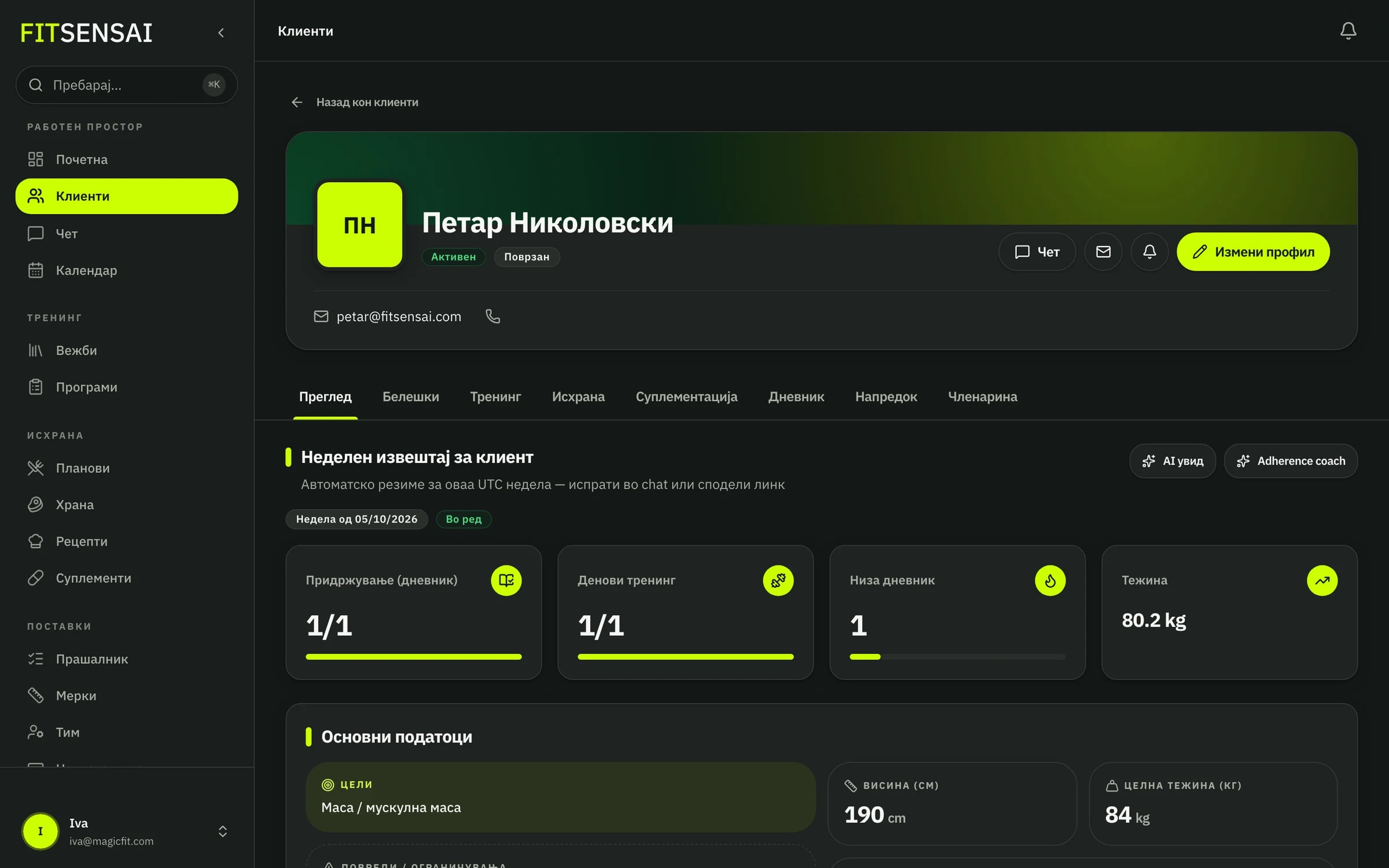
The client profile brings together the diary, workouts, program, nutrition plan and progress — the same data they enter in the app, as soon as they save it.
Diary
Every meal with a photo, time and macros, and how much is left to hit the day's target.
Workouts
What they completed, with how much weight and how many reps — per exercise and per set, against the program.
Your template stays untouched. The client gets their own copy, and you tailor sets, reps and rest just for them.
Meals and grams from the food catalog. The server calculates the macros, and you can add a swap for every food.
Weight, body fat, circumferences and steps from Apple Health or Health Connect — with the change since the last measurement.
Client app
iOS and Android, in Macedonian and English. Clients pay nothing — their coach invites them with a code.
How it works
Workspace today, clients tomorrow.
Create a client and send an invite code. They download the app and join your workspace.
Build or clone a program and nutrition plan, then assign. The client gets a copy — your template stays clean.
Clients snap or describe meals and log workouts. You see who is falling behind, and Coach AI helps you reply faster.
Pricing
One workspace subscription — unlimited clients. Clients never pay separately.
unlimited clients
9949€/mo.
Full FitSensai access: clients, programs, nutrition, Coach AI, and team tools.
unlimited clients
1069529€/yr.
€49/mo × 12, minus 10%
Full FitSensai access: clients, programs, nutrition, Coach AI, and team tools.
Want clients to download an app under your name? Fully branded app
White-label
unlimited clients · your name on the stores
Clients download YOUR app from the App Store and Google Play — your name, logo, and icons. This is not FitSensai with a logo pasted inside. It is a separate listing: splash screen, icons, and the name they see are yours. You still run the same FitSensai (Studio) for clients, programs, nutrition, and Coach AI.
Studio is self-serve: you pay and start immediately. Branded is a separate product. Write to us, we agree on the name and visual identity, we build the iOS and Android binaries and submit them for review. Setup is included — no setup fee. We run hosting, API, and updates.
We publish on FitSensai Apple and Google accounts (seller: FitSensai), so you do not pay for Apple Developer Program or Google Play Console. If you want the seller to be your company, that needs your own developer accounts — tell us.
199€/mo.
Or €2149/year (10% off vs 12 × €199)
12-month minimum.
Request branded appNot self-serve — first a conversation, then we build the app.
For custom terms · request a custom quote
Contact
Tell us your client count and what matters most — we'll set up a workspace so you can try the platform.
FAQ
The client snaps a meal (camera or gallery) and AI estimates ingredients and macros. They can edit and save to the diary.
They can describe it in words (describe what you ate) — AI estimates macros and ingredients the same way.
No. Coach AI only suggests — replies, swaps, programs and analyses. Nothing is sent and nothing is saved to the client's plan until you click.
From what is already in your workspace: goals, injuries and limitations, the nutrition diary, logged sets and the latest messages. It picks exercises and foods only from your library.
No. The subscription is for the trainer/nutritionist (or studio). Clients use the mobile app free via invite.
A separate iOS and Android listing with your name, logo, and icons. Clients download it as your app, not as FitSensai. Full FitSensai (Studio) is included. We publish on FitSensai Apple and Google accounts (seller: FitSensai), so you do not pay extra store fees. Setup is included. This is not self-serve — write to us from the pricing section and we build it. €199/month, 12-month minimum.
Start the subscription on the site — it takes you to app.fitsensai.com. Create a profile, pay, and the workspace is ready immediately.
The client app supports Macedonian and English (mk/en), switchable in settings. AI analysis supports mk/en too.
Email info@fitsensai.com from the address you paid with, or use the cancellation link on the AgentaOS receipt. Cancellation stops the next renewal; you keep access until the paid period ends. Refund requests are reviewed within 14 days — see Cancellation and refunds.
Open the demo and click through a real trainer dashboard — clients, programs, nutrition, chat and AI tools. No sign-up.